
Chlorine lock: why your pool won’t hold chlorine, and how to fix it
If you keep adding chlorine and your pool keeps testing low, you don’t have a chlorine problem, you have a cyanuric acid problem. Here’s the chemistry every pool owner should understand, and why most apps get the target dose wrong.

If you’ve been pouring chlorine into your pool and the free chlorine reading still won’t budge, you’re not adding too little. You’re adding it under a chemistry condition that’s defusing it before it can work. That condition is called chlorine lock, and the cause is almost always one parameter most home test kits don’t even include: cyanuric acid (CYA).
This guide breaks down what chlorine lock actually is, how to identify it, the fix that actually works (and the one that doesn’t), and why most pool calculator apps recommend doses that are off by hundreds of grams, because they ignore CYA entirely.
What is chlorine lock?
Chlorine lock is the casual industry name for what happens when your pool’s cyanuric acid (CYA) level is so high that your free chlorine becomes chemically inert. The chlorine is still in the water, your test reading isn’t lying, but it can’t actively oxidise organic matter, kill bacteria, or break down chloramines fast enough to keep up with the demand.
The reason this happens is that cyanuric acid binds chlorine. That binding is what makes outdoor pools possible: without it, sunlight would burn off your chlorine in under two hours. CYA is a stabiliser. It holds chlorine in reserve so UV doesn’t destroy it.
The problem is the reserve relationship is non-linear. As CYA climbs, the percentage of your free chlorine that’s actually active (the killer form, hypochlorous acid) drops sharply. By the time CYA hits 100 ppm or above, you need three to four times the chlorine you’d normally use just to maintain the same active level.
The shorthand: CYA in the 30–50 ppm range = normal stabiliser benefit. CYA above 80 ppm = increasingly diminishing returns. CYA above 100 ppm = chlorine lock territory. Above 150 ppm = drain-and-refill territory.
Why does CYA build up?
Cyanuric acid doesn’t degrade. Unlike chlorine, which oxidises away, or pH, which drifts naturally, CYA sits in your water indefinitely. The only ways to lower it are dilution (drain and refill), specialty chemical reducers (limited effectiveness), or reverse osmosis filtration.
It builds up because stabilised chlorine products contain CYA. If you’re using:
- Trichlor tablets (the most popular pool chlorine, often called “3-inch tabs”): every 1 kg of trichlor adds about 600 g of CYA.
- Dichlor granular shock: every 1 kg adds about 570 g of CYA.
- Cyanuric acid stabiliser: 100% CYA, added intentionally to bring the level up.
For a typical 50,000-litre pool, using trichlor as your daily chlorine source will push CYA past 50 ppm within a single summer. Most pool owners never test for CYA, so they don’t notice, until their pool starts going green despite “perfect” chlorine readings.
The signs you’re in chlorine lock
Chlorine lock has a distinctive symptom pattern. If you see two or more of these together, test your CYA before you reach for more chlorine:
- Free chlorine reads OK on test strips, but the water still looks cloudy or has a slight green tint.
- You’re shocking the pool but it’s not clearing. The standard “10× the combined chlorine” rule isn’t working.
- Your chlorine demand has tripled. You’re using two to three times the chlorine you used at the start of the season for the same result.
- The water has a strong chloramine smell (that “pool smell”, that’s not chlorine, it’s chloramines).
- Algae starts to bloom despite measurable free chlorine. This is the giveaway. If you have any green tint and your free chlorine reads above 3 ppm, you have a CYA problem.
The test that confirms it
You need a cyanuric acid test. Most general pool test strips don’t include CYA, so you’ll need either:
- A liquid kit that includes CYA (e.g. Taylor K-2006C, the gold standard).
- A digital photometer with CYA capability.
- A specific CYA test strip (less accurate but workable).
Most home test kits use a turbidity-based test: you add a reagent that causes CYA to cloud the water, and you read how cloudy it gets against a graduated cylinder. Anything above 100 ppm is high. Above 150 ppm and the standard test reads “off the chart”, at that point, only a dilution test (1:1 with distilled water, then double the reading) will give you an accurate number.
Warning: If your test cylinder is completely opaque from the bottom, your CYA is at least 150 ppm. Don’t add more chlorine and don’t shock harder, those won’t help and they’ll push CYA higher. The only fix at this point is dilution.
How to actually fix chlorine lock
There’s one fix that works reliably, and a handful of partial fixes worth knowing about.
1. The fix that always works: dilute the pool water
Drain a portion of your pool and refill with fresh water. The replacement percentage scales linearly with CYA:
| Current CYA | Target CYA | Replacement % |
|---|---|---|
| 100 ppm | 40 ppm | ~60% |
| 150 ppm | 40 ppm | ~73% |
| 200 ppm | 40 ppm | ~80% |
| 300 ppm | 40 ppm | ~87% |
For most pool owners, draining 30–40% of the water and refilling is enough to bring CYA from the 100–120 ppm zone down to acceptable. The cost is your water bill plus a few hours of hose time.
2. Stop adding stabilised chlorine
While you’re trying to drop CYA, switch to unstabilised chlorine:
- Liquid chlorine (sodium hypochlorite), 12.5% strength, no CYA.
- Cal-hypo (calcium hypochlorite) granular, 65–75% chlorine, no CYA, but adds calcium hardness.
- Saltwater chlorine generators, produce hypochlorite directly from salt, no CYA contribution.
You’ll dose more frequently because you no longer have stabiliser protection, but you’ll stop the CYA climb.
3. Specialty CYA reducers (partial fix)
A handful of products claim to remove cyanuric acid without draining. The most credible is Bio-Active, which uses a bacterial breakdown process and can lower CYA by 30–50% over 7–10 days. It works, but it’s slow, expensive, and only practical for moderately high CYA (in the 80–120 ppm range, not for 200+).
4. Reverse osmosis (the nuclear option)
Mobile reverse osmosis services can run your pool water through an RO membrane on-site, stripping out CYA, calcium, salt, and dissolved solids without draining. Costs $400–$800 USD for a typical pool. Worth it if you’re in a water-restricted area or have an extreme problem.
The deeper problem: target chlorine isn’t a fixed number
Here’s where most pool advice, and most apps, go wrong. They tell you “keep free chlorine between 1 and 3 ppm.” That’s correct for a CYA of zero. It’s dangerously low for a CYA of 80 or 100 ppm.
The actual relationship was worked out by the Trouble Free Pool community based on pool chemistry research (the Pickens method, refined in the 2010s). The active chlorine you need to maintain bacterial kill depends on your CYA level:
| CYA (ppm) | Minimum free chlorine (ppm) | Target free chlorine (ppm) | Shock level (ppm) |
|---|---|---|---|
| 0 | 0.5 | 1–3 | 10 |
| 30 | 2 | 3–5 | 12 |
| 50 | 4 | 4–6 | 20 |
| 80 | 6 | 6–10 | 31 |
| 100 | 8 | 7–11 | 39 |
| 150 | 12 | 11–17 | 59 |
If your CYA is 80 and your test kit reads “perfect” free chlorine at 2 ppm, you’re actually below the minimum needed to prevent algae. That’s why your pool can be “balanced” on paper and still going green.
The formula most pros use: minimum free chlorine = 7.5% of CYA, target = 11.5% of CYA, shock = 40% of CYA. So at 80 ppm CYA: minimum 6 ppm, target 9 ppm, shock 32 ppm. Nothing on a generic test-strip chart will tell you that.
Why most pool apps get this wrong
Pool Math (by Trouble Free Pool) has been the only major app to consistently apply CYA-based targeting. It’s free on the web and $5 on mobile. But most other apps, including some of the most popular paid ones on the App Store, still use static targets that ignore CYA.
The reason is that CYA-based math feels counterintuitive to new pool owners. “Why do I need 8 ppm of chlorine? That sounds like a lot.” It is, when your CYA is 100 ppm. It’s also exactly correct.
If you take one thing from this guide: any chlorine recommendation that doesn’t ask for your CYA reading is wrong. That includes the chart on the back of your chlorine bottle, the dosing guide that came with your test kit, and most of the calculators on the internet.
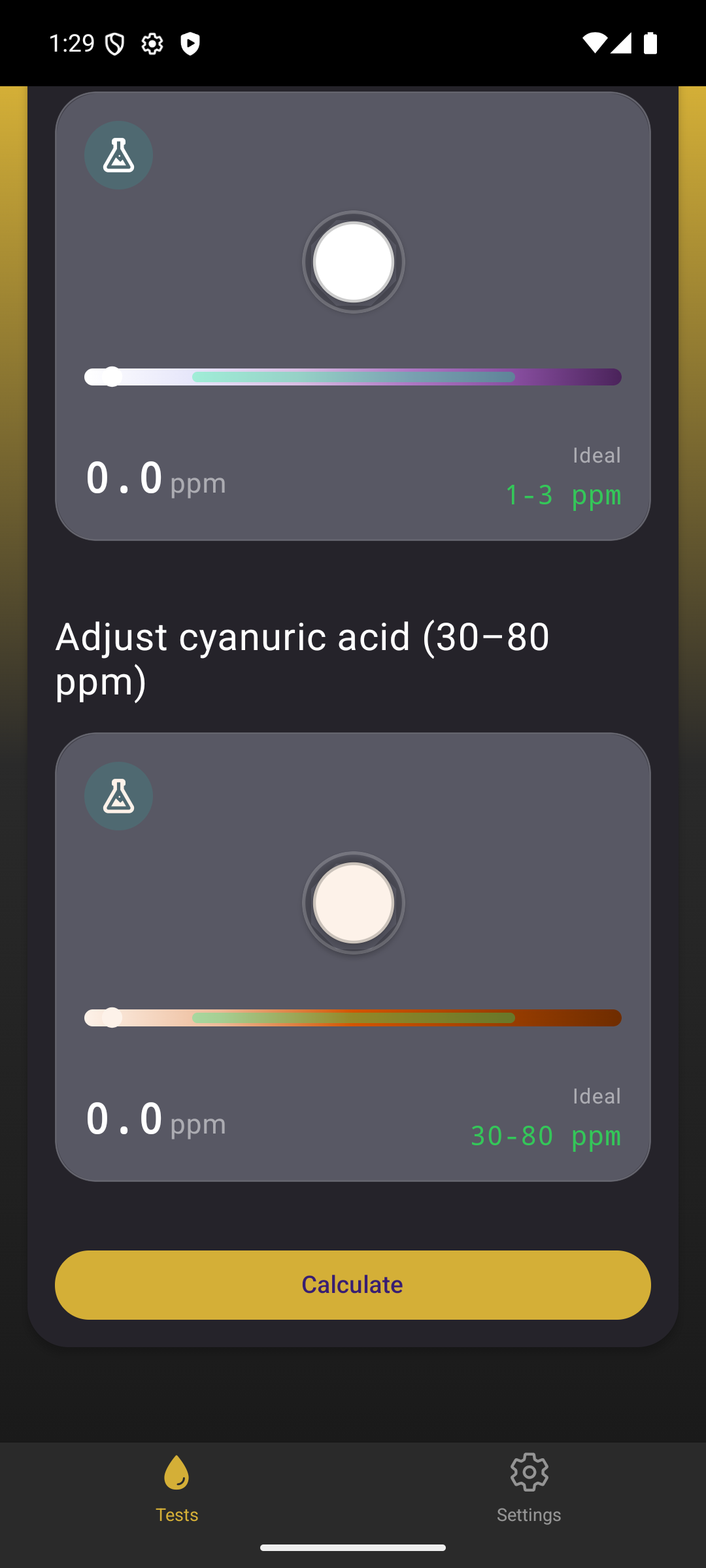
The first app that gets this right by default
Water Test Calculator auto-calculates your target chlorine from your CYA reading every time you test, no looking up charts, no manual maths, no chance of dosing for “1–3 ppm” when you actually need 9 ppm. Just enter your readings; the app does the chemistry. Free on iOS and Android in 10 days.
What to do this week
If your pool is fighting you right now, here’s the exact order:
- Test for CYA. If you don’t have a kit that does this, buy one today, Taylor K-2005 or K-2006 covers it. Until you know your CYA, every other decision is a guess.
- Calculate your real target. Multiply your CYA reading by 0.115 (e.g. CYA 80 × 0.115 = 9.2 ppm free chlorine target). That’s where your free chlorine should be living, not 1–3 ppm.
- If CYA < 80 ppm: raise free chlorine to the new target using liquid chlorine. Re-test daily, hold the level for 3–5 days.
- If CYA 80–100 ppm: stop using stabilised chlorine. Switch to liquid. Top up CYA only when it drops below 30.
- If CYA > 100 ppm: partial drain. Replace 30–40% of the water. Then re-test and continue.
- If CYA > 150 ppm: larger drain (50–70%), or book a mobile RO service.
Then once the pool is back in balance, set up a weekly testing schedule that includes CYA. Once a month is enough for stable pools; weekly if you’re still using trichlor.
Frequently asked questions
Can I just add fresh water without draining anything?
Splash-out and evaporation cause natural water replacement over the summer, which slowly drops CYA. But it’s slow, typically less than 10 ppm per month. If you’re at 150 ppm, natural turnover won’t fix you before the pool goes green.
Will high CYA hurt swimmers?
High CYA itself is not directly dangerous, the safety limit set by the WHO and most national health bodies is around 100–200 ppm. The danger is indirect: when CYA is high, your effective sanitiser level drops, and that means bacteria can grow. Health authorities recommend keeping CYA under 100 ppm specifically because of this sanitation risk.
Does shock breaking work above 100 ppm CYA?
Yes, but you need more shock, typically 40% of your CYA level in free chlorine. At 150 ppm CYA, that’s a shock level of 60 ppm free chlorine, which is 12+ kg of dichlor or 25+ litres of liquid chlorine for a 50,000-litre pool. Cheaper to drain.
Is CYA the same as stabiliser, conditioner, or isocyanurate?
Yes, all the same thing. Different brand names for cyanuric acid: “stabiliser”, “conditioner”, “isocyanurate”, “CYA”, “cyanuric”. They’re all chemically identical and they all build up in the same way.
Do indoor pools have this problem?
Rarely. CYA exists to protect chlorine from UV. Indoor pools don’t need it. If you have an indoor pool with measurable CYA, someone added it by mistake, likely by using trichlor tablets out of habit.
The takeaway
Chlorine lock isn’t a chlorine problem. It’s a CYA problem dressed up as a chlorine problem. The fix is mechanical (dilute the water) and behavioural (stop using stabilised chlorine). Anyone telling you to “shock harder” or “add more chlorine” without asking your CYA reading is treating a symptom and ignoring the cause.
The good news: once you understand the relationship, you control it. You test CYA, you calculate the right chlorine target from your CYA level, and you stay ahead of it. The Water Test Calculator app exists specifically because this calculation should be automatic, not something every pool owner has to relearn from charts every week.
Free PDF reference of the targets above: sign up below and we’ll send you the Pool & Spa Quick-Reference Checklist plus a launch alert when Water Test Calculator goes live on the App Store and Google Play (around 10 days).
Get the launch alert + free checklist
Be first to know when Water Test Calculator launches. Free with ads. Premium unlocks unlimited test history, smart notifications, and ad-free testing.